How we engineered the SkylonHost network
The network is one of the most important components of any server hosting provider - a server that is not online is useless. We have put a lot of effort into making sure our network is fast, reliable and secure. In this article, we will take a deep dive into how our network is designed, why we made certain choices and how it benefits our customers.
Network Architectures
We knew from the beginning that we wanted to build a highly scalable network that's redundant by design for our Prague point of presence (PoP). There are several common setups hosting providers use, which we will describe briefly before going into our specific architecture.
Bridged network
In a bridged network setup, the hypervisor acts as a bridge between the virtual machines and the physical network. Each VM is effectively directly connected to the physical network, presents with its own MAC address and becomes a part of the broadcast domain.
This setup is probably the simplest and most common one among boutique providers. However, it does carry significant disadvantages and security risks if not properly maintained. The whole network effectively becomes a large broadcast domain, which can make troubleshooting extremely difficult. The hypervisor has to perform a significant amount of layer 2 filtering to ensure isolation between VMs and mitigate any potential security risks, including sniffing of traffic between VMs, ARP spoofing, and MAC address spoofing.
Routed network
The hypervisor is turned into a router, and routes traffic between the external network and VMs. There are several variants of routed network setups, but this is the general idea. This type of setup provides better isolation between VMs, as each VM is in its own subnet, within its own layer 2 domain, and the hypervisor can enforce strict routing rules.
In the most basic form of routed network, a block of public IP addresses is routed to each hypervisor, and each VM is assigned one of those public IPs. This approach is somewhat naive, as it has several significant drawbacks. First of all, it is not possible to live-migrate VMs between hypervisors, since each IP address block is tied to a particular hypervisor. Additionally, it is wasteful of IP space.
Our design
Neither of these conventional approaches really suited us. We wanted the following features without compromises:
- Live migration of VMs between hypervisors
- Efficient use of IP space
- IPv6 native
- Built-in redundancy
- Secure by design
The best option seemed to be a routed network setup, where we would route individual IPv4 /32 and IPv6 /64 from our core routers, through each hypervisor, down to each individual VM. This approach satisfies all the requirements we had and maintains super strong isolation between VM instances. Each IP address is owned by a VM rather than by a hypervisor or a network component, allowing for 100% assignment efficiency and flexibility. Several hyperscalers use a design similar to this one, and it is likely one of the more secure and efficient types of virtual networking, however, it requires a significant upfront engineering effort to set up.
In such a setup, dynamic routing is a must, since maintaining static routes throughout the network would be a nightmare, especially in the event of any network changes or failures. We decided on using BGP (Border Gateway Protocol) as our internal dynamic routing protocol, as it is very robust, very well supported, and flexible enough for our needs. Routes are defined on the hypervisor level and tied to each VM instance, with our control panel managing this aspect automatically during the whole lifecycle of each instance.
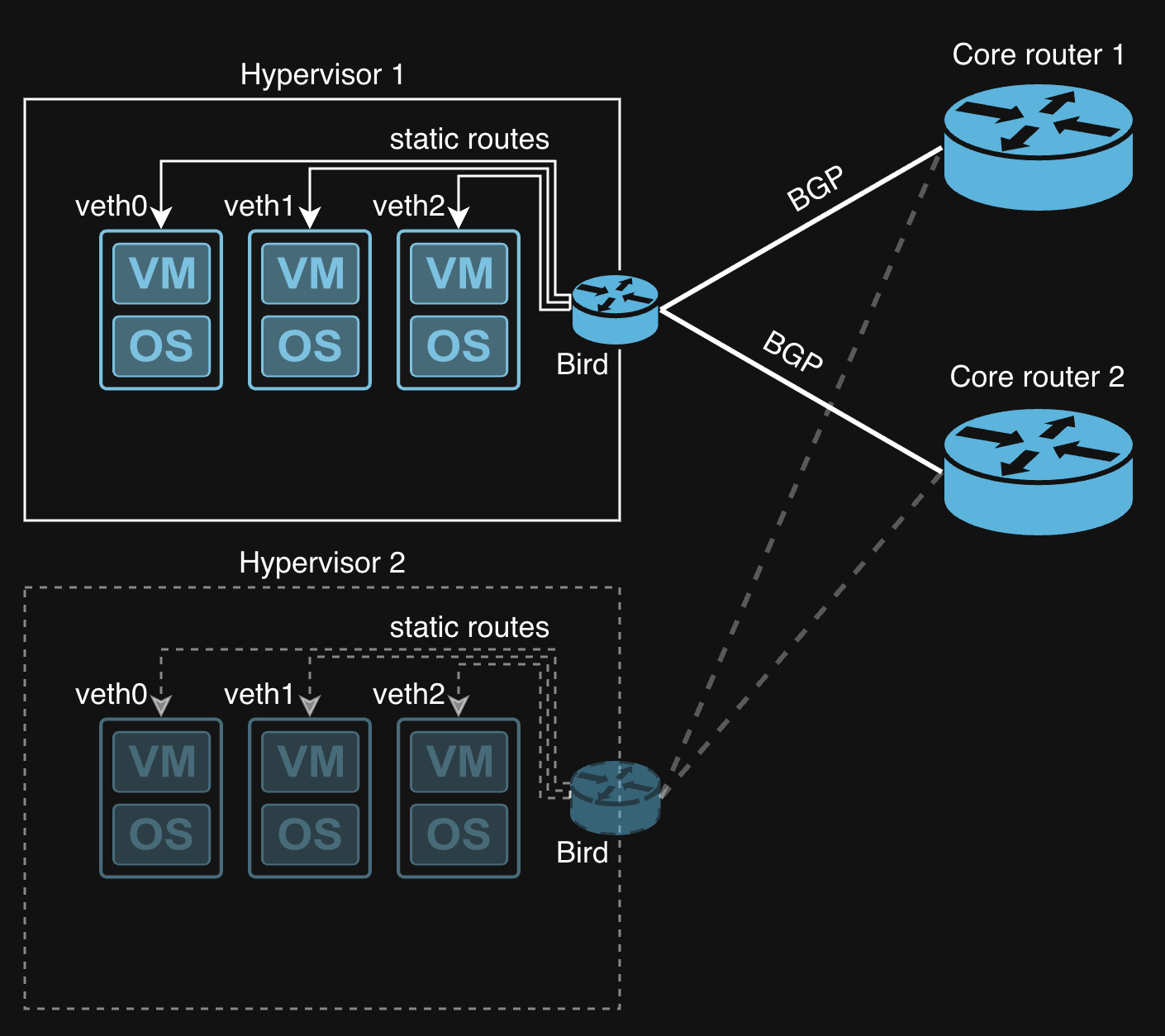
We run a Bird instance on each hypervisor, which peers with our core routers over point-to-point links and announces a set of IP addresses of each VM. If any router or network path goes down, BGP automatically reroutes traffic through the remaining healthy paths, ensuring high availability for all of our customer VMs. When multiple paths are available, routes will get merged into ECMP (Equal-Cost Multi-Path) groups, allowing for load balancing of traffic across all available links and ensuring no available capacity is wasted.
DHCP
One particular challenge that remained was how to handle address assignments to VM instances. While we could have easily relied on static IP assignment, that approach is inconvenient for some operating systems and customer workflows. We wanted to provide DHCP as an option for customers who prefer it, but implementing DHCP in a routed network setup is not always straightforward.
We ended up with a design where we run a dedicated DHCP server for each instance, on each virtual ethernet interface. That DHCP server is then responsible for assigning one pre-determined /32 address.
Handing out /32 DHCP leases is not super straightforward, since DHCP is designed to assign addresses within a subnet, and a /32 is effectively a single host. It is nonetheless possible to achieve with the standard ISC DHCP server with the following configuration:
option domain-name-servers 8.8.8.8, 8.8.4.4, 1.1.1.1;
option subnet-mask 255.255.255.255;
option routers 172.16.0.1;
shared-network "29F21439-5D56-4FE1-8A1B-FF403286A709" {
  subnet 172.16.0.1 netmask 255.255.255.255 {
  }
  subnet 109.248.43.3/32 netmask 255.255.255.255 {
    range 109.248.43.3/32;
  }
}
lease-file-name "/var/lib/dhcpd/veth0.leases";
deny declines;
deny duplicates;
one-lease-per-client true;
ignore-client-uids true;
authoritative;
allow unknown-clients;
default-lease-time 2592000;
max-lease-time 2592000;
Where the 172.16.0.1 address is the default gateway for each VM - this address is assigned on every virtual interface on the hypervisor side.
This design was possible to implement because we designed our own custom control panel and hypervisor management software from the ground up, giving us the flexibility to accommodate this design.
In conclusion, we are very happy with how our network turned out, and it has been serving our customers reliably and efficiently for several years by now.
Back to Blog